
Download ChipGenius – Free USB Device Info Tool for Windows
Overview
ChipGenius is a lightweight, portable utility designed to reveal every detail about USB devices that are connected to a Windows computer. Whether you are troubleshooting a malfunctioning thumb drive, identifying a mysterious peripheral, or simply need to verify the firmware version of a newly purchased gadget, ChipGenius delivers the information instantly without the need for a full driver installation or registry digging. The program runs directly from an executable, so there is no installation wizard, no background service, and no lingering registry entries—just a click and the data appears. This makes it an ideal companion for IT professionals, hardware enthusiasts, and anyone who frequently works with USB peripherals such as flash drives, external hard disks, webcams, printers, or USB‑to‑serial adapters. By consolidating data that would otherwise be scattered across Device Manager, Windows Explorer, and third‑party diagnostic tools, ChipGenius saves time, reduces guesswork, and helps you pinpoint issues before they become critical failures.
Key Features and Capabilities
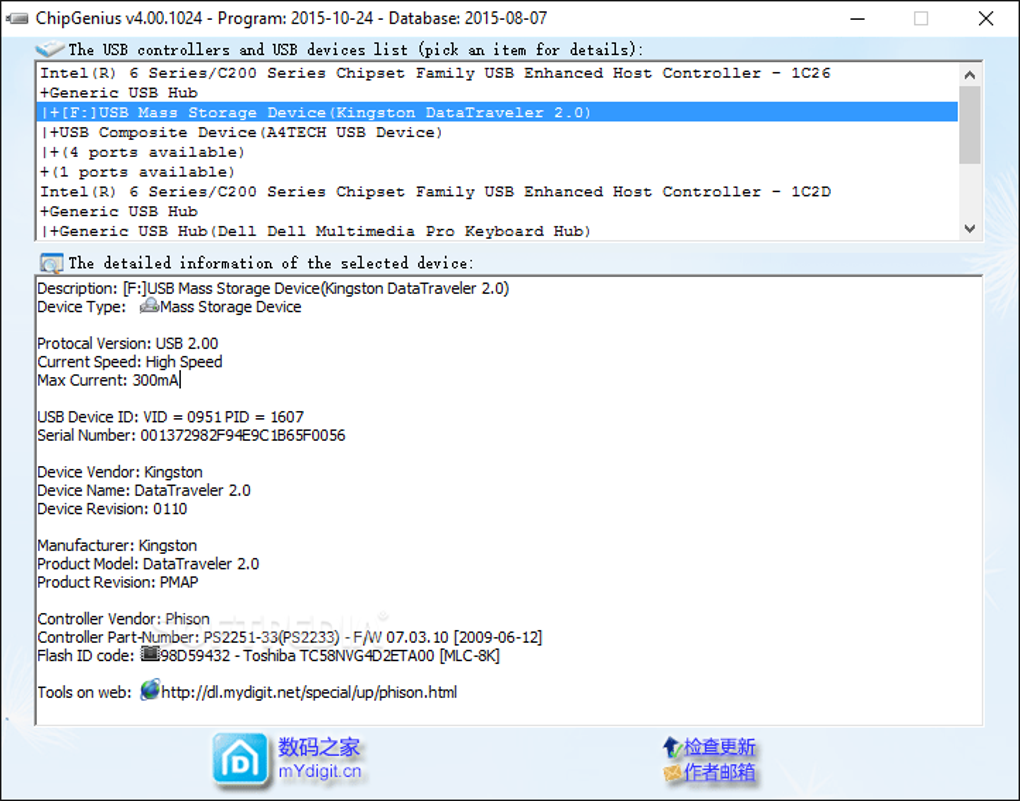
- Comprehensive Device Identification: Displays vendor ID, product ID, device class, subclass, and protocol for every USB device.
- Real‑Time Status Monitoring: Shows whether the USB device is currently active, paused, or experiencing errors.
- Protocol & Speed Details: Reports the USB version (1.0, 2.0, 3.0, 3.1) and the negotiated data transfer rate.
- Installation Timestamp: Provides the exact date and time the device was first recognized by the operating system.
- Serial Number & Firmware Info: Extracts the unique serial number and any firmware version data that the device exposes.
- Export & Save Functionality: Allows you to export the collected information to a text file or a dedicated folder for future reference.
- Portable Execution: No installation required; run the executable from any folder or USB stick.
- Minimal System Impact: Consumes negligible RAM and CPU, making it safe to use on production machines.
- Quick Refresh: One‑click refresh to update the view after plugging or unplugging a device.
- Secure Data Handling: All information is read directly from the hardware; no data is transmitted to external servers.
Beyond the raw data, ChipGenius presents the information in a clean, column‑based UI that groups related attributes together, making it easy to scan for the details you need. The program also includes a small tooltip system that explains technical terms for users who may not be familiar with USB specifications. For developers, the utility can serve as a quick verification tool when testing new hardware prototypes, as it surfaces the exact descriptors that the device reports to the host. In environments where multiple identical devices are deployed—such as a lab of identical USB sensors—ChipGenius helps you differentiate each unit by its serial number, preventing mix‑ups and ensuring proper inventory tracking.
Installation, Usage & Compatibility
One of ChipGenius’s biggest selling points is its zero‑install nature. To get started, simply download the ChipGenius.exe file from the official website, place it in a folder of your choice, and double‑click to launch. Because the program runs as a portable executable, you can keep a copy on a USB flash drive and use it on any Windows PC without leaving traces behind.
Step‑by‑Step Usage Guide
- Download the executable: Visit the official download page and click the “Download ChipGenius (Free)” button. The file size is under 1 MB.
- Run as Administrator (optional): For best results on Windows 10/11, right‑click the file and select “Run as administrator.” This ensures ChipGenius can read low‑level device descriptors that may be hidden from standard users.
- Connect your USB device: Plug in the peripheral you wish to inspect. ChipGenius automatically detects the new connection and populates the grid with the device’s data.
- Review the details: Browse the columns to see vendor ID, product ID, speed, serial number, and more. Hover over any field for a tooltip explanation.
- Export if needed: Click the “Save Report” button to generate a .txt file. Choose a destination folder, and the report will be saved for later analysis or sharing with support teams.
- Refresh or disconnect: Use the refresh icon to update the view after changing device settings, or simply unplug the device and the entry will disappear automatically.
System Requirements
ChipGenius is built for 32‑bit and 64‑bit versions of Windows 7, Windows 8, Windows 10, and Windows 11. The application does not run on macOS, Linux, Android, or iOS, as it relies on Windows USB driver interfaces. Minimum hardware requirements are modest: any PC with a 1 GHz processor, 256 MB RAM, and a functional USB controller can run ChipGenius without performance degradation. Because it is a portable tool, there are no additional dependencies such as .NET Framework or Visual C++ redistributables.
For corporate environments that enforce strict application whitelisting, ChipGenius can be added to the approved list because it does not modify the system. Its small footprint (under 1 MB) also means it can be distributed via group policy or a shared network folder with ease. Security‑focused IT teams will appreciate that the utility never writes to the registry, never contacts external servers, and can be run in a sandboxed environment if needed.
Pros & Cons – Quick Verdict
Pros
- Portable: No installation, no registry changes.
- Instant USB device detection and detailed reporting.
- Lightweight: Minimal CPU and memory usage.
- Exportable reports for documentation or support tickets.
- Free to download and use for personal or commercial purposes.
- Clear UI with tooltips for non‑technical users.
- Works on all modern Windows versions (7‑11).
Cons
- Windows‑only; no native macOS or Linux version.
- Limited to USB device information; does not diagnose internal hardware issues.
- No built‑in USB power consumption meter.
- Interface is functional but not highly customizable.
- Updates are manual; users must download the latest executable.
Overall, the advantages of ChipGenius far outweigh its minor drawbacks. For anyone whose daily workflow involves USB peripherals, the ability to instantly pull comprehensive device data without a cumbersome installation process is a clear productivity boost.
Frequently Asked Questions
-
Is ChipGenius safe to use on corporate PCs?
Yes. ChipGenius is a portable executable that does not modify the registry, install services, or communicate with external servers. It reads USB descriptors directly from the operating system, making it safe for use in locked‑down corporate environments.
-
Can ChipGenius identify counterfeit USB drives?
While ChipGenius cannot guarantee detection of counterfeit hardware, it reveals the vendor ID, product ID, serial number, and firmware version. By comparing these values against known authentic specifications, users can spot inconsistencies that may indicate a fake device.
-
Do I need to run ChipGenius as administrator?
Running as administrator is optional but recommended on Windows 10/11, especially if the USB device uses advanced descriptors that require elevated privileges to read. The tool works without admin rights for most standard peripherals.
-
How often is ChipGenius updated?
Updates are released periodically to add support for new USB specifications and to fix minor bugs. Users must manually download the latest version from the official website, as the tool does not include an auto‑update feature.
-
Can I use ChipGenius on a USB‑C hub with multiple devices attached?
Yes. ChipGenius enumerates every device that the Windows USB stack reports, regardless of whether they are connected directly to a port or through a hub. Each device appears as a separate entry in the interface.
Conclusion – Should You Download ChipGenius?
If you regularly work with USB peripherals, need a fast way to gather detailed device information, or simply want a reliable troubleshooting companion, ChipGenius is an excellent free tool that delivers on its promises. Its portable nature, comprehensive data set, and straightforward UI make it a must‑have for IT technicians, developers, and power users alike. Download ChipGenius today to start diagnosing USB devices instantly—no installation, no hassle, just pure, actionable insight.







